
A camera has many parts, each playing an important role in capturing photos and videos. From the body and lens to the buttons and internal components, every piece works together to help you take clear, sharp, and creative shots. In this article, we’ll explore all the essential parts of a camera, where they are located, and what they do.
List of Camera Parts
- Body
- Lens Mount
- Lens
- Shutter Release Button
- Mode Dial
- LCD Screen
- Viewfinder
- Flash
- Battery Compartment
- Memory Card Slot
- Tripod Mount
- USB/HDMI Ports
- Focus Ring (on lens)
- Zoom Ring (on lens)
- Image Sensor
- Shutter Mechanism
- Aperture
- Mirror (in DSLR cameras)
- Pentaprism/Pentamirror (in DSLR cameras)
- Image Processor
- Autofocus System
- Metering Sensor
- Stabilization System
Camera Parts with Diagram
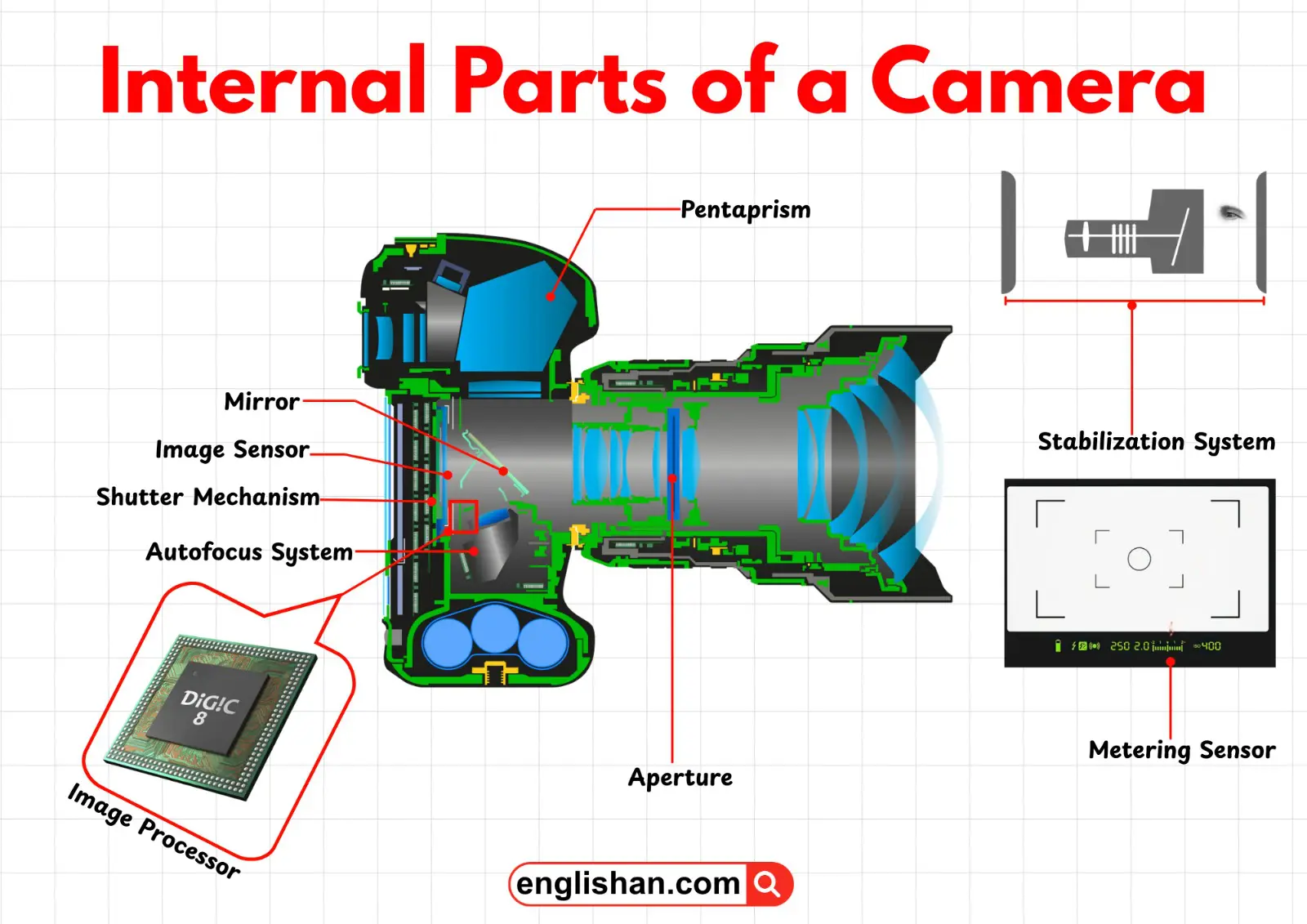
A camera is a carefully designed imaging system made up of two main sections: the external parts (body, buttons, lens, and screen) and the internal parts (sensor, shutter, processor, and autofocus system). Each part plays an important role in capturing images, controlling light, and ensuring smooth operation. When you take a photo, light enters through the lens, passes through the aperture and shutter, and hits the image sensor, which records the scene. Understanding the parts of a camera by name makes it much easier to see how the system works and how each component contributes to creating clear and sharp photos.
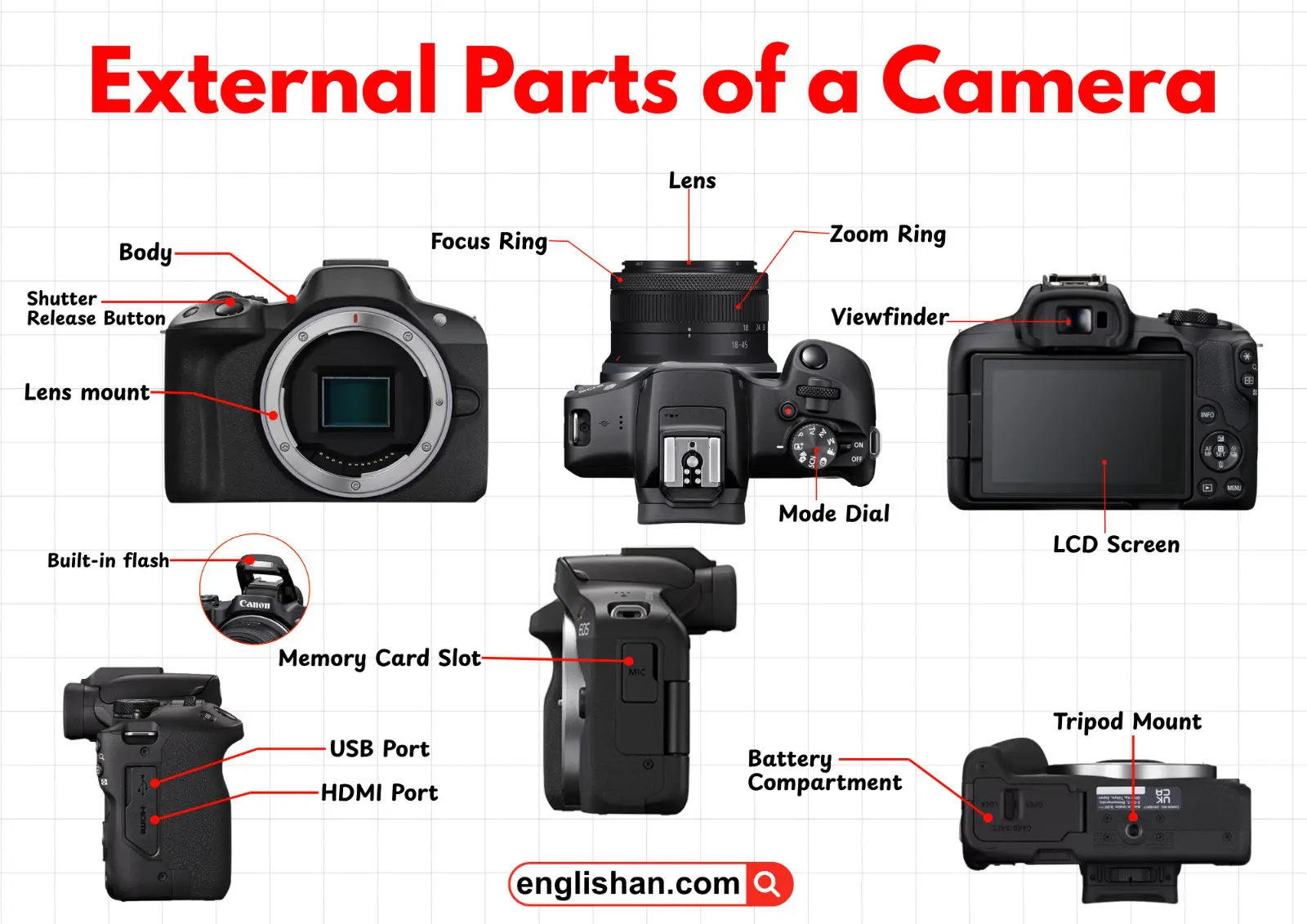
External Parts of a Camera
Body
The body is the main structure of the camera that holds everything together. You’ll usually hold the camera by the body, and it’s made of strong plastic or metal for durability. The body also provides ergonomics grips and contours to make holding and shooting comfortable.
Lens Mount
The lens mount is located at the front of the camera body. It’s the part where you attach the lens. Modern mounts often have electronic contacts so the camera and lens can communicate for autofocus, aperture control, and image stabilization. It ensures the lens stays secure and functions correctly
Lens
The lens screws or clicks into the lens mount at the front. It acts like the camera’s eye, gathering and focusing light onto the sensor to form an image. Different lenses give you different perspectives — wide-angle, telephoto, or zoom — and high-quality lenses make your photos sharper and clearer.
Shutter Release Button
This button is usually on the top right of the camera body, easy for your index finger to reach. Pressing it opens the shutter, letting light hit the sensor and capturing the image. Many cameras have a two-stage press: a half-press to focus and a full press to take the photo.
Mode Dial
The mode dial is typically on top of the camera near the shutter button. It lets you switch between shooting modes like automatic, manual, or scene-specific modes. It helps you quickly adjust settings depending on your environment or creative choice.
LCD Screen
The screen is located on the back of the camera. It shows your shot in real-time, displays menus, and lets you review images. Many modern screens are touch-sensitive, so you can change settings, focus points, or navigate menus just by tapping.
Viewfinder
Found at the back, usually above the LCD, the viewfinder is where you look to frame your shots. DSLRs have an optical viewfinder using mirrors and a pentaprism, while mirrorless cameras use an electronic viewfinder (EVF) that shows a digital image. It’s especially useful in bright sunlight when the LCD can be hard to see.
Memory Card Slot
Often next to the battery compartment or on the side, this is where you insert the memory card to store your photos and videos. Different cameras accept different card types, like SD or CompactFlash.
Flash
Built-in flashes usually pop up from the top of the camera body. They provide extra light in dim environments. You can also attach external flashes on the hot shoe for more powerful or controlled lighting.
Battery Compartment
This is usually on the bottom or side of the camera. It holds the camera’s battery securely, allowing easy replacement or recharging when needed.
Tripod Mount
A small threaded hole on the bottom of the camera lets you attach it to a tripod or monopod. This is useful for long exposures, video recording, or when using heavy lenses to keep the camera steady.
Zoom Ring (on lens)
Found on zoom lenses, this ring adjusts the focal length. Turning it zooms in or out on your subject without moving the camera, allowing better composition from a fixed position.
USB/HDMI Ports
These ports are located on the side or sometimes under a protective flap. USB lets you transfer photos to a computer, while HDMI can connect the camera to a TV or monitor. Some cameras can even charge through the USB port.
Focus Ring (on lens)
On the lens itself, the focus ring lets you manually adjust the focus. By rotating it, you can make a subject sharper, which is helpful in low light or for creative control over your focus.
Internal Parts of a Camera
Image Sensor
Located inside the camera body behind the lens and shutter, the sensor captures light and converts it into an image. It has millions of tiny pixels that record color and brightness, making digital photography possible.
Shutter Mechanism
The shutter sits between the lens and the sensor. Pressing the shutter release opens it for a specific time, controlling how much light reaches the sensor. Faster shutter speeds freeze motion, while slower speeds can create motion blur.
Metering Sensor
The metering sensor measures the light in a scene and tells the camera the right exposure settings, balancing highlights and shadows for a properly lit photo.
Aperture
Inside the lens, the aperture is like the pupil of an eye. It opens and closes to let in more or less light. The size also affects depth of field, which determines how much of the scene is in focus.
Mirror (in DSLR cameras)
Inside a DSLR, the mirror reflects light from the lens up into the viewfinder so you can see your subject. When you take a photo, it flips out of the way so the sensor can capture the image.
Pentaprism/Pentamirror (in DSLR cameras)
Located above the mirror, this part corrects the flipped image so you see it correctly in the viewfinder. The pentaprism is made of glass, while a pentamirror uses multiple mirrors.
Stabilization System
This system reduces blur caused by shaky hands. It can be built into the lens (optical) or the camera body (sensor-shift), helping you capture sharper images, especially in low light or with long lenses.
Image Processor
The processor is like the camera’s brain. It takes data from the sensor and turns it into a digital image. It also handles color, sharpness, noise reduction, and autofocus, affecting the camera’s overall speed and performance.
Autofocus System
This system automatically focuses the lens on your subject. It uses sensors, motors, and sometimes a dedicated processor to keep images sharp, even for moving subjects.
Additional Parts of a Camera
External Flash Hot Shoe
The hot shoe is a mount on top of the camera body for external accessories like powerful flashes, microphones, or wireless triggers.
Articulating or Tilting LCD Screen
This type of screen can tilt or rotate, making it easier to shoot from high, low, or awkward angles without straining yourself.
Touchscreen Interface
Touchscreens let you navigate menus, select focus points, and review images with taps and swipes, just like a smartphone.
Customizable Buttons and Dials
These let you assign your favorite functions to specific buttons or dials, giving you quick access to the settings you use most often while shooting.
Key Takeaway
As we learned, a camera is made up of external and internal parts that work together to capture images. The body, lens, buttons, and screen allow you to control and compose shots, while the sensor, shutter, processor, and autofocus system handle light, focus, and image processing. Understanding these parts helps you use your camera more effectively and take better photos.
You May Also Like