
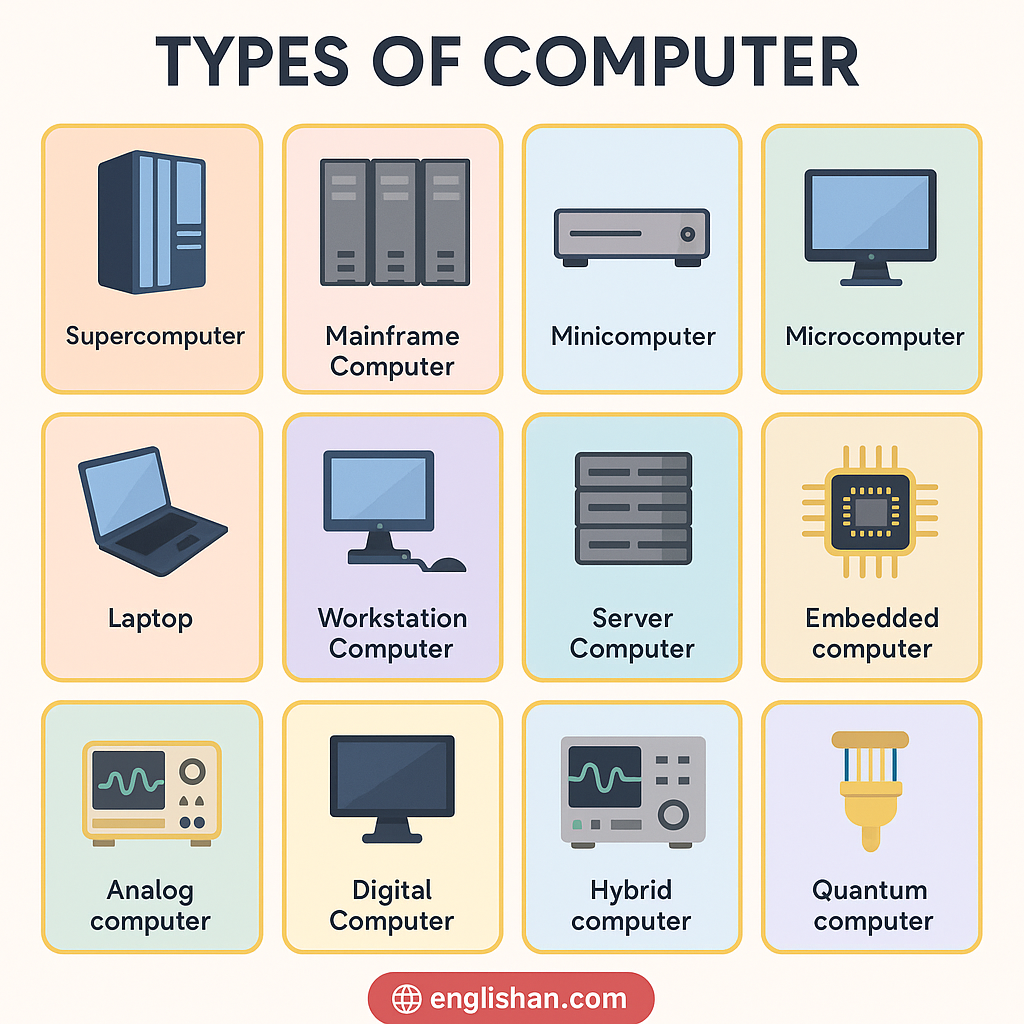
Understanding the types of computer helps students and beginners learn how each one works and why it matters. These names build your tech vocabulary and help you group computers by size, use, and power. In this post, you’ll learn the major types and special-use computers with short meanings and easy examples. Each category is shown with pictures to help you remember. From mainframe to quantum computer, every type plays a unique role in today’s world.
List of All Computer Types
- Supercomputer
- Mainframe Computer
- Minicomputer
- Microcomputer
- Desktop Computer
- Laptop
- Tablet
- Smartphone
- Workstation
- Server
- Embedded Computer
- Hybrid Computer
- Analog Computer
- Digital Computer
- Quantum Computer
Main Computer Types
These are the base categories of computers based on their size, speed, and processing power. Learning these types helps you understand how computing devices are grouped from large to small.
Supercomputer
A supercomputer is the most powerful type used for massive calculations like weather forecasting, space research, and nuclear simulations.
Key Characteristics of Supercomputer:
- Extremely fast in processing large amounts of data
- Used in government, space, and defense research
- Requires special cooling systems and large rooms
- Can perform trillions of operations per second
Mainframe Computer
Mainframe computers manage large databases and transactions in places like banks, government offices, and airline systems.
Key Characteristics of Mainframe Computer:
- Handles hundreds of users at the same time
- High storage and data processing capability
- Used in enterprise-level systems and bulk processing
- Very secure and reliable for important operations
Minicomputer
Minicomputers are mid-range systems used in factories, labs, and small organizations for process control and data analysis.
Key Characteristics of Minicomputer:
- Smaller than mainframes, larger than microcomputers
- Suitable for department-level tasks
- Can support multiple users
- Often used for technical and scientific work
Microcomputer
A microcomputer is the most common type. Devices like desktops, laptops, and tablets are microcomputers.
Key Characteristics of Microcomputer:
- Designed for single users
- Affordable and portable
- Used at homes, schools, and offices
- Runs general-purpose software
Common Types of Computers We Use
These computers are designed for personal, portable, and daily use. They are common in homes, schools, and offices.
Laptop
A laptop is a portable computer that fits in your bag and is used for work, study, or entertainment.
Key Characteristics of Laptop:
- Lightweight and portable
- Rechargeable battery for mobile use
- Built-in screen, keyboard, and touchpad
- Used by students and professionals
Desktop
A desktop computer stays on a table and is used in offices, homes, and computer labs for long sessions.
Key Characteristics of Desktop:
- Fixed setup with monitor and CPU
- More powerful than laptops in the same price range
- Easy to upgrade parts
- Ideal for long working hours
Tablet
A tablet is a flat-screen device without a physical keyboard, good for reading, watching videos, and browsing.
Key Characteristics of Tablet:
- Touchscreen-based device
- Lightweight and easy to carry
- Longer battery life than laptops
- Used for casual tasks
Smartphone
A smartphone is a handheld device with a touchscreen, often used for calling, messaging, apps, and web use.
Key Characteristics of Smartphone:
- Smallest type of microcomputer
- Supports communication, media, and apps
- Portable and always connected
- Acts as a mini computer in your pocket
Types of Special-Purpose Computers
These are built for specific tasks and are used in science, business, or machines. They may not look like regular computers but perform dedicated jobs.
Workstation
A workstation is a high-performance computer used for engineering, graphic design, video editing, and 3D modeling.
Key Characteristics of Workstation:
- High-end CPU and GPU
- Multi-monitor support
- Used for technical, creative, and industrial software
- Expensive but reliable
Server
A server provides services and resources to other computers over a network, like hosting websites, files, or emails.
Key Characteristics of Server:
- Always on and network-connected
- Stores, manages, and delivers data
- Supports multiple clients or users
- Used in both small and large networks
Embedded Computer
An embedded computer is built into another machine like a microwave, car, or smartwatch to control specific functions.
Key Characteristics of Embedded Computer:
- Performs one dedicated task
- Not visible or used directly by users
- Small in size and low in power
- Used in appliances and machines
Hybrid Computer
A hybrid computer mixes analog and digital features and is often used in medical machines like ECG and hospital monitors.
Key Characteristics of Hybrid Computer:
- Combines speed of digital and detail of analog
- Converts signals in real-time
- Often found in hospitals and research labs
- Rare for general public
Analog Computer
Analog computers work with continuous signals and are used in scientific instruments, flight simulators, and speedometers.
Key Characteristics of Analog Computer:
- Handles real-time continuous data
- Works with physical quantities like temperature or pressure
- No binary data involved
- Limited usage today
Digital Computer
Digital computers process data using binary format (0s and 1s). All common personal computers are digital.
Key Characteristics of Digital Computer:
- Works with discrete values (0 and 1)
- Accurate and programmable
- Found in homes, schools, and businesses
- Most commonly used computer type
Quantum Computer
Quantum computers are experimental machines that use quantum bits and are used in AI, encryption, and complex simulations.
Key Characteristics of Quantum Computer:
- Works using quantum bits (qubits)
- Extremely powerful for specific tasks
- Still in development stage
- Used in advanced research
FAQs on Computer Types
Supercomputers handle complex scientific tasks; mainframes manage many users and transactions at once.
Yes, smartphones are microcomputers with computing abilities like processing, storage, and connectivity.
Servers store and send data to other devices over a network, like websites or cloud storage.
Yes, they’re specialized computers made to perform specific control functions in devices or machines.
You May Also Like