
A motherboard is like the backbone of your computer because it connects all the important parts and makes sure everything works together smoothly. From the CPU and RAM to the USB ports and expansion slots, every component has its own place and function. In this article, we will explore the main parts of a motherboard, explain what they do, and show a diagram to make it easier to understand.
List Of Motherboard Parts With Names
- USB Port
- Ethernet Port
- Speaker Port
- Line-In / Auxiliary Audio Port
- Microphone Port
- Parallel Port
- PS/2 Mouse Port
- PS/2 Keyboard Port
- VGA Port
- Southbridge (Chipset)
- Northbridge (Chipset)
- IDE Controller
- RAM Slots
- Power Connectors
- CPU Heat Sink and Mounting Points for Fans
- CPU Socket
- PCI Slot (Expansion Slot)
- Floppy Controller
- CMOS Battery
- AGP Slot
- Serial Port
- Audio Ports
- Connectors for Integrated Peripherals
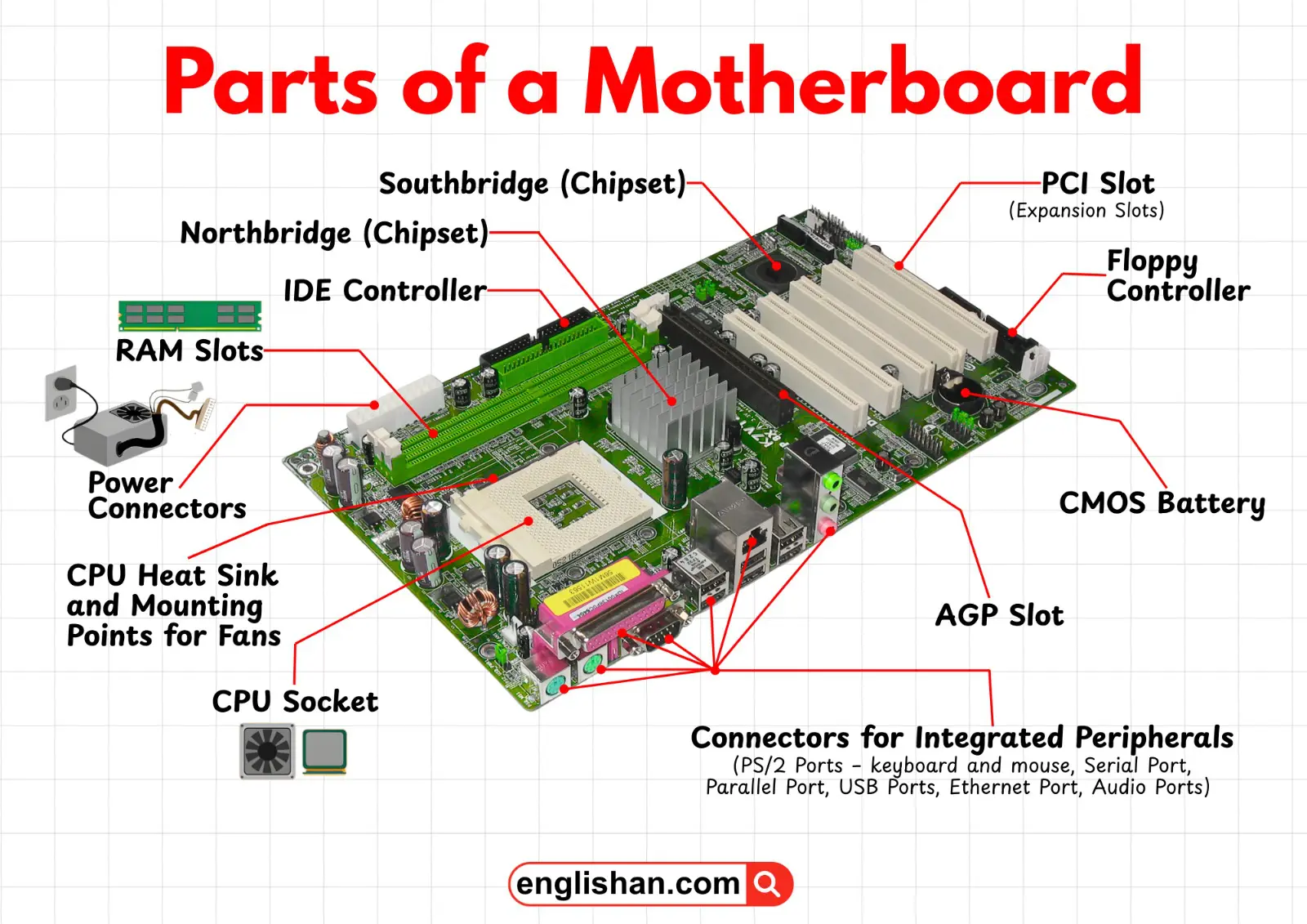
Motherboard Parts Diagram With Names
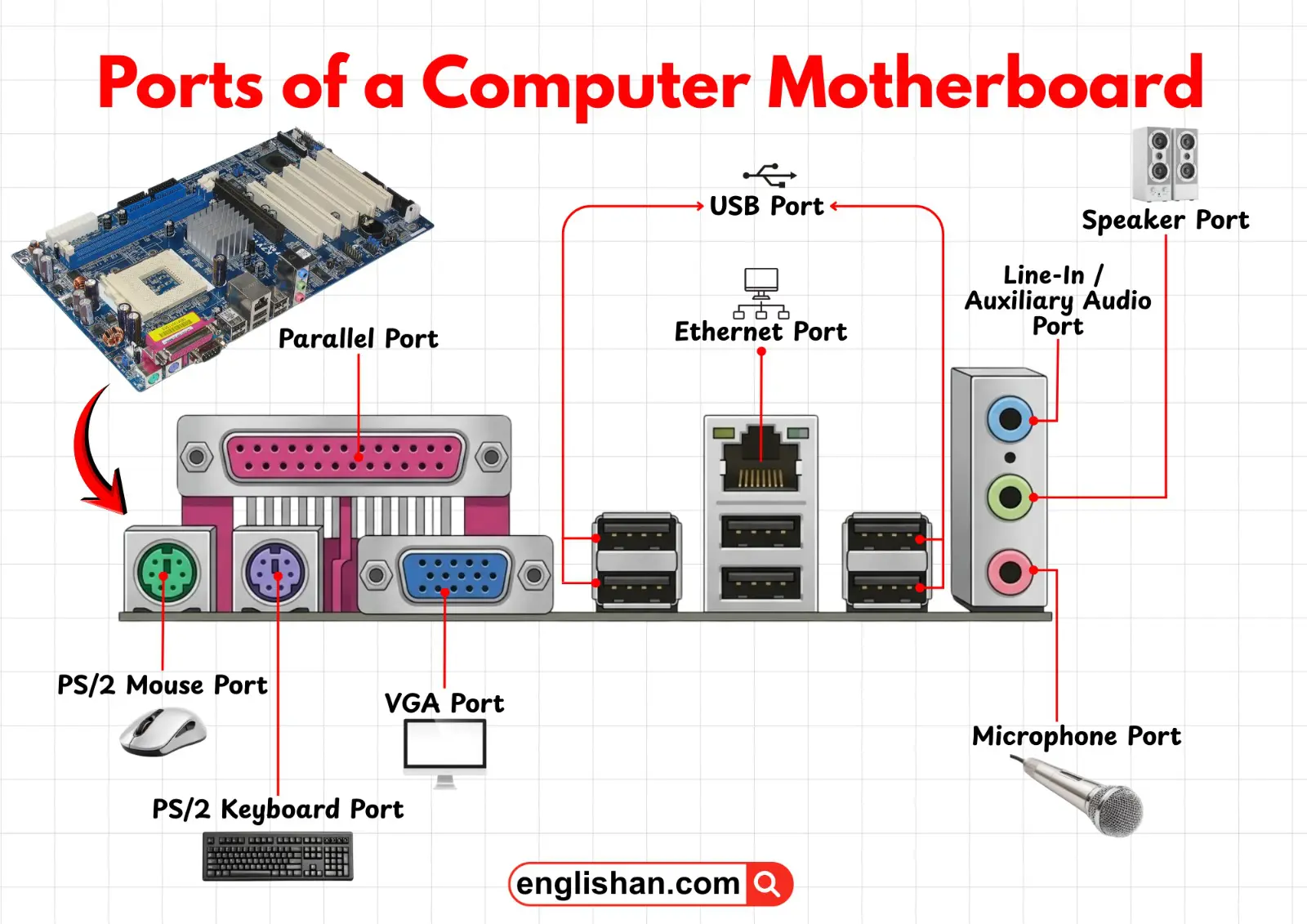
A motherboard is the main circuit board that connects all computer components. The CPU socket holds the processor, RAM slots store memory, and expansion slots allow add-on cards. Power connectors supply electricity, while storage ports link hard drives and SSDs. Chipsets manage communication between components, and rear I/O ports like USB, audio, and Ethernet let you connect external devices.
Input / Output Ports
USB Port
The USB port (Universal Serial Bus) is one of the most commonly used ports on a motherboard. It allows users to connect external devices such as keyboards, mice, flash drives, printers, and external hard drives. USB ports support fast data transfer and can also provide power to connected devices.
Ethernet Port
The Ethernet port is used to connect a computer to a wired network or the internet using an Ethernet cable. It provides a stable and fast internet connection compared to wireless networks and is commonly used in offices and homes.
Speaker Port
The speaker port is used to connect external speakers to the computer. It sends audio signals from the computer so users can hear music, videos, system sounds, and other audio clearly through speakers.
Line-In / Auxiliary Audio Port
The Line-In or Auxiliary Audio port is designed to receive audio signals from external audio devices. Devices such as CD players, musical instruments, or audio mixers can be connected through this port to input sound into the computer.
Microphone Port
The microphone port allows users to connect a microphone to the computer. It is mainly used for voice recording, video calls, voice commands, and online meetings.
Parallel Port
The parallel port is an older type of connection used mainly for printers and some scanners. It transfers multiple bits of data simultaneously through several wires, but it has mostly been replaced by USB ports in modern computers.
PS/2 Mouse Port
The PS/2 mouse port is a round connector specifically designed for connecting a mouse to the computer. It was commonly used in older computers before USB devices became popular.
PS/2 Keyboard Port
The PS/2 keyboard port is used to connect a keyboard directly to the motherboard. Like the PS/2 mouse port, it is mainly found in older systems and has largely been replaced by USB keyboards.
VGA Port
The VGA (Video Graphics Array) port is used to connect a computer to a monitor or display. It transmits analog video signals from the computer to the screen so users can see images and videos.
Serial Port
The serial port is a communication interface that transfers data one bit at a time. It was traditionally used for devices such as modems, older mice, and industrial equipment.
Audio Ports
Audio ports are used to connect audio devices like headphones, speakers, and microphones. They allow the computer to send and receive sound signals for multimedia use.
Expansion Slots
PCI Slot (Expansion Slot)
The PCI (Peripheral Component Interconnect) slot allows users to add extra hardware components to the computer. Expansion cards such as sound cards, network cards, and TV tuner cards can be installed in these slots.
AGP Slot
The AGP (Accelerated Graphics Port) slot is specifically designed for installing a graphics card. It provides faster communication between the graphics card and the motherboard, improving video and gaming performance.
Memory Components
RAM Slots
RAM slots are the connectors on the motherboard where RAM (Random Access Memory) modules are installed. RAM temporarily stores data that the computer is actively using, which helps the system run programs faster and more efficiently.
Processor Components
CPU Socket
The CPU socket is the place on the motherboard where the processor (CPU) is installed. It connects the processor to the motherboard and allows it to communicate with other components of the computer.
CPU Heat Sink and Mounting Points for Fans
The CPU heat sink and fan mounting points help keep the processor cool. The heat sink absorbs heat from the CPU, while the fan helps remove that heat to prevent overheating and maintain system performance.
Chipset Components
Northbridge (Chipset)
The Northbridge chipset controls communication between the CPU, RAM, and graphics card. It handles high-speed data transfers and plays an important role in system performance.
Southbridge (Chipset)
The Southbridge chipset manages slower communication tasks such as USB ports, audio devices, storage controllers, and other input/output functions.
Storage Controllers
IDE Controller
The IDE (Integrated Drive Electronics) controller connects storage devices like hard drives and optical drives to the motherboard. It manages data transfer between these storage devices and the computer.
Floppy Controller
The floppy controller manages the connection between the motherboard and a floppy disk drive. It allows the system to read and write data from floppy disks, which were commonly used for storage in older computers.
Power Components
Power Connectors
Power connectors supply electrical power from the power supply unit to the motherboard and its components. They ensure that all parts of the computer receive the energy needed to operate properly.
CMOS Battery
The CMOS battery provides power to the motherboard to store system settings such as date, time, and BIOS configuration even when the computer is turned off.
Integrated Peripheral Connectors
Connectors for Integrated Peripherals
These connectors allow built-in peripherals such as keyboards, mice, USB devices, audio devices, and network connections to communicate with the motherboard. They help integrate multiple external devices into the computer system efficiently.
Key Takeaways
As we learned, the motherboard is the central circuit board that connects and manages all the important components of a computer. It includes ports for connecting external devices like keyboards, mice, speakers, and monitors, as well as slots for installing hardware such as RAM and expansion cards. The CPU socket, chipset, and power connectors help the processor and other parts work together efficiently, while controllers and connectors manage storage and peripheral devices. Overall, the motherboard acts as the main hub that allows all computer components to communicate and function smoothly.
You May Also Like