

The parts of a calculator are a display, a keypad, a power source, a circuit board, and a processor chip. A printing calculator adds a printing unit, and a scientific calculator adds function keys.
A handheld four-function calculator runs from the display at the top to the chip on the circuit board. Scientific, graphing, and printing calculators add function keys, a larger display, or a printing unit. The pencil and the pen are two other tools of the same desk.
Parts of a Calculator Labeled Diagram
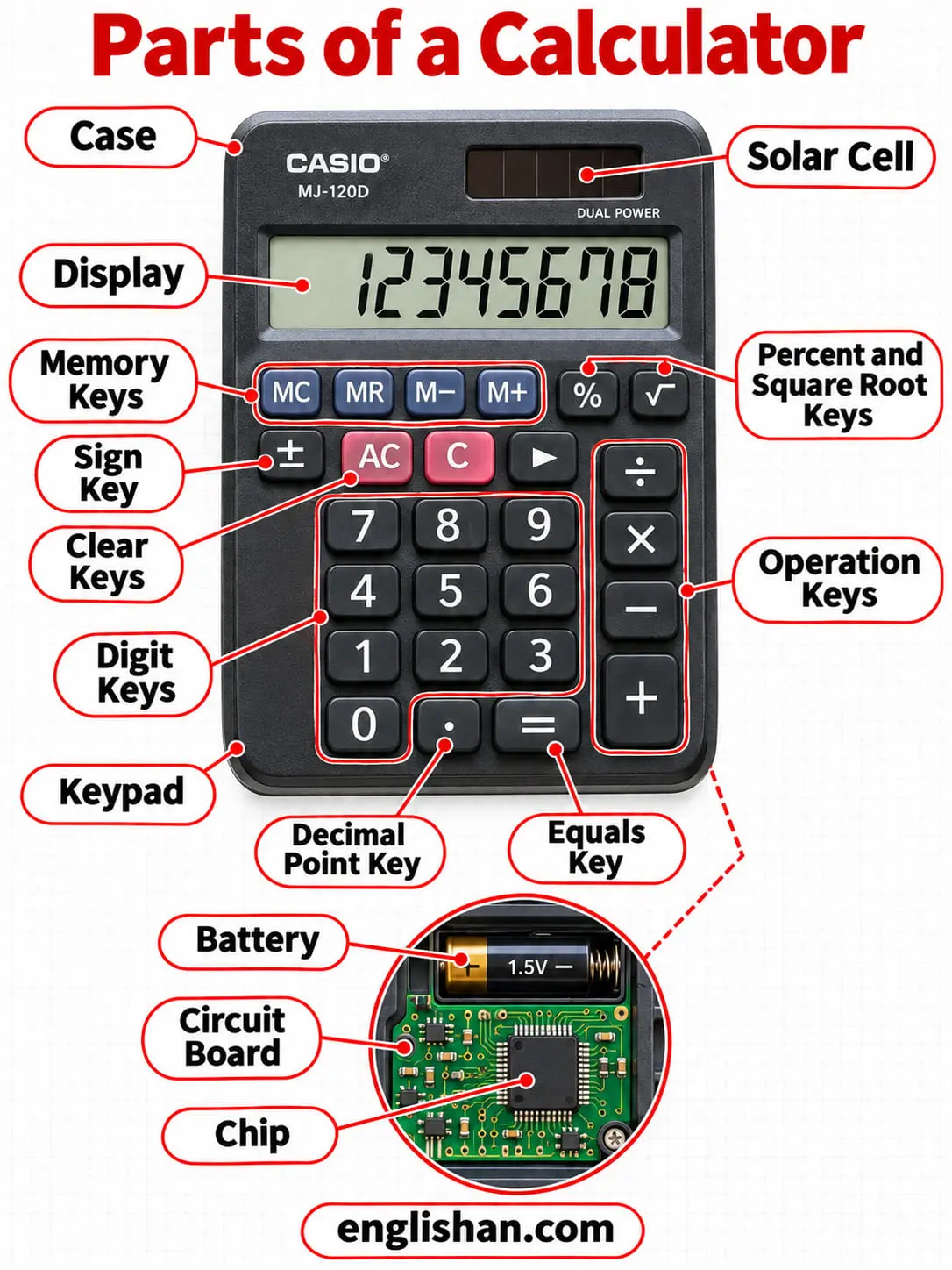
In a labeled diagram of a calculator, the display and the solar cell are on the upper face. The keypad fills the lower body. The circuit board, the chip, and the battery are inside the case, behind the keys.
| Part | Where you find it |
|---|---|
| 1. Case | Outer shell that encloses the circuit board |
| 2. Display | Screen over the keypad that shows the entry and the answer |
| 3. Solar cell | Strip of photovoltaic cells on the front, beside the display |
| 4. Keypad | Block of keys under the display |
| 5. Digit keys | Keys marked 0 through 9 in the center of the keypad |
| 6. Decimal point key | Key marked with a dot, beside the zero key |
| 7. Operation keys | Plus, minus, multiply, and divide keys |
| 8. Equals key | Key marked = that returns the result |
| 9. Percent and square root keys | Function keys marked % and √ |
| 10. Clear keys | Keys marked C, AC, and CE |
| 11. Memory keys | Keys marked MC, MR, M+, and M− |
| 12. Sign key | Key marked ± that switches a number between positive and negative |
| 13. Battery | Cell inside the case that supplies power when the light is dim |
| 14. Circuit board | Board behind the display and the keys |
| 15. Chip | Processor on the circuit board that performs the arithmetic |
How Many Parts a Calculator Has
A calculator has no single count, because references group the parts differently. A reference on electronic calculators names six: the power source, the keypad, the display, the printing unit, the processor chip, and the circuit board. The printing unit belongs to printing models only.
A five-part count names the input keypad, the processor, the memory registers, the display, and the power unit. The memory registers are inside the chip, so the two counts describe the same calculator.
Calculator Display Parts
Among the parts of a calculator, the display is the output screen over the keypad. It shows each number as it is entered and the result of every operation.
Display Panel and LCD
The display panel is the screen. A liquid crystal display, or LCD, is the standard type, and it replaced the earlier light-emitting diode and vacuum fluorescent displays.
Digit Segments and Dot Matrix
A four-function calculator forms each digit from seven segments. Advanced calculators use a dot-matrix display, which draws characters from a grid of dots.
Parts of a Calculator Keypad
The keypad is the block of keys under the display. A key press closes a circuit under a rubber dome and signals the chip which key was pressed.
Digit and Decimal Keys
The digit keys, 0 through 9, enter numbers. Some calculators add 00 and 000 keys that make large numbers faster to enter. The decimal point key separates the whole part of a number from the fraction.
Operation and Equals Keys
The operation keys are plus, minus, multiply, and divide. The equals key returns the result. The percent key and the square root key perform those two functions directly.
Clear Keys
The C key, also marked AC, clears everything. C is short for clear, and AC is short for all clear. The CE key clears the last entry, and a second press clears everything.
Memory Keys
The memory keys store a number for later. MC clears the memory, and MR recalls it. M+ adds the displayed number to the memory, and M− subtracts it.
Sign Key
The sign key, marked ± or CHS, changes the sign of the displayed number. CHS is short for change sign.
Calculator Power Parts
The power source of the parts of a calculator is a battery, a solar cell, or both. Wall power runs older desktop models.
Solar Cell
The solar cell is a strip of photovoltaic cells on the front of the case. It converts light into electric current. Covering the cell switches off some models.
Battery
The battery is a cell inside the case. It powers calculators without a solar cell and keeps solar models running in dim light. Some models switch off after a period of inactivity.
Internal Parts of a Calculator
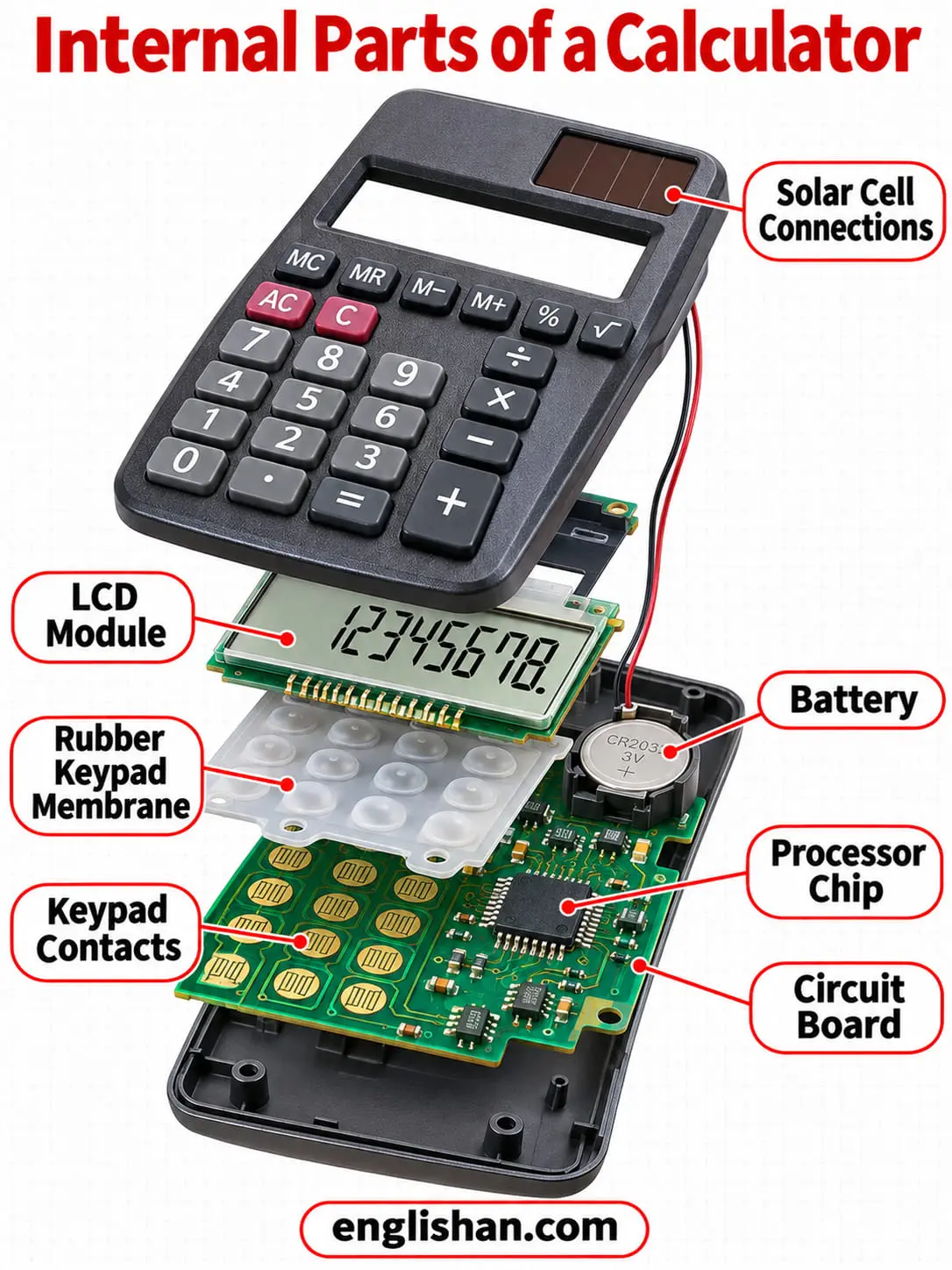
The internal parts of a calculator are the circuit board and the chip. Both are mounted behind the display and the keypad. Early calculators used several boards, and later designs removed the printed circuit board.
Circuit Board
Among the internal parts of a calculator, the circuit board connects the keypad, the display, and the chip. It conducts the signals between them.
Chip
The chip is the processor that performs the calculation. It contains seven units.
Scanning unit: The scanning unit watches the keypad for a key press.
X and Y registers: The registers store numbers during a calculation. Every number enters the X register first.
Flag register: The flag register stores the pending operation until it is needed.
Read-only memory: The ROM stores the built-in function instructions. It cannot be erased.
User memory: The RAM stores the numbers the user enters, and its contents are changeable.
Arithmetic logic unit: The ALU performs the arithmetic and returns the result.
Binary decoder: The decoder converts binary code into the form that drives the display and keypad scan.
Most pocket calculators use binary-coded decimal, which simplifies driving a digit display. The ALU processes the X and Y values digit by digit.
Parts of a Scientific Calculator
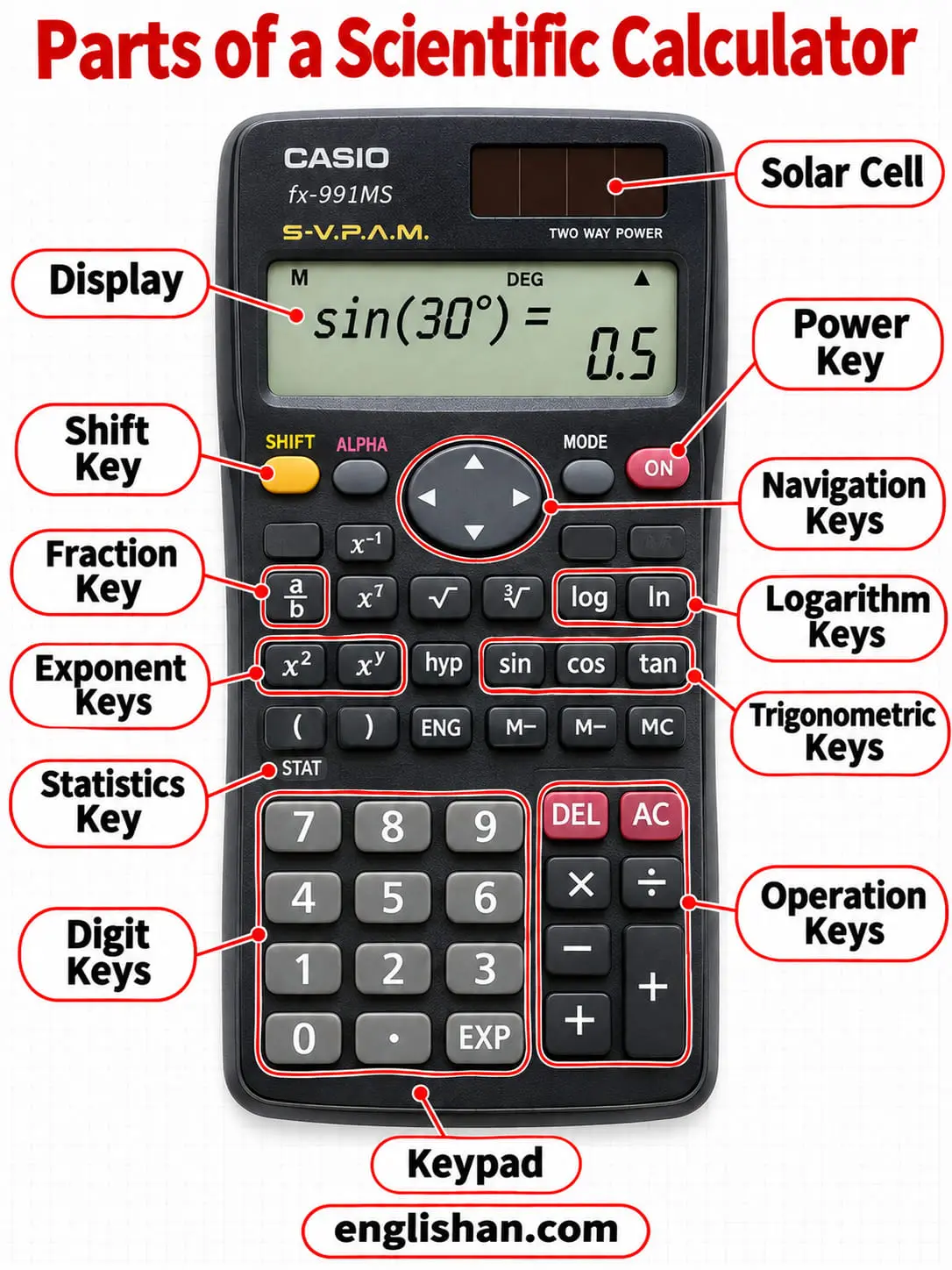
A scientific calculator has the display, keypad, power source, circuit board, and chip of a four-function model. It adds function keys for trigonometry, logarithms, exponents, statistics, and fractions.
Function Keys
Trigonometric keys: These enter sine, cosine, and tangent. Some models add the hyperbolic functions.
Logarithm keys: They cover logarithms in base 10 and in base e.
Exponent and root keys: They cover powers and roots beyond the square root.
Statistics and fraction keys: They cover probability, data calculations, and fraction entry.
Constants keys: They enter π and e directly.
Second Function Key
Among the parts of a calculator for advanced work, the second function key is marked 2nd or shift. It switches the next key press to the function printed over the key.
Scientific Display
A single-line display shows 10 to 12 digits, with extra digits for the exponent. A two-line display shows the entered formula in the upper dot-matrix row. A natural textbook display shows a problem as it is written on the page.
Graphing and Printing Calculator Parts
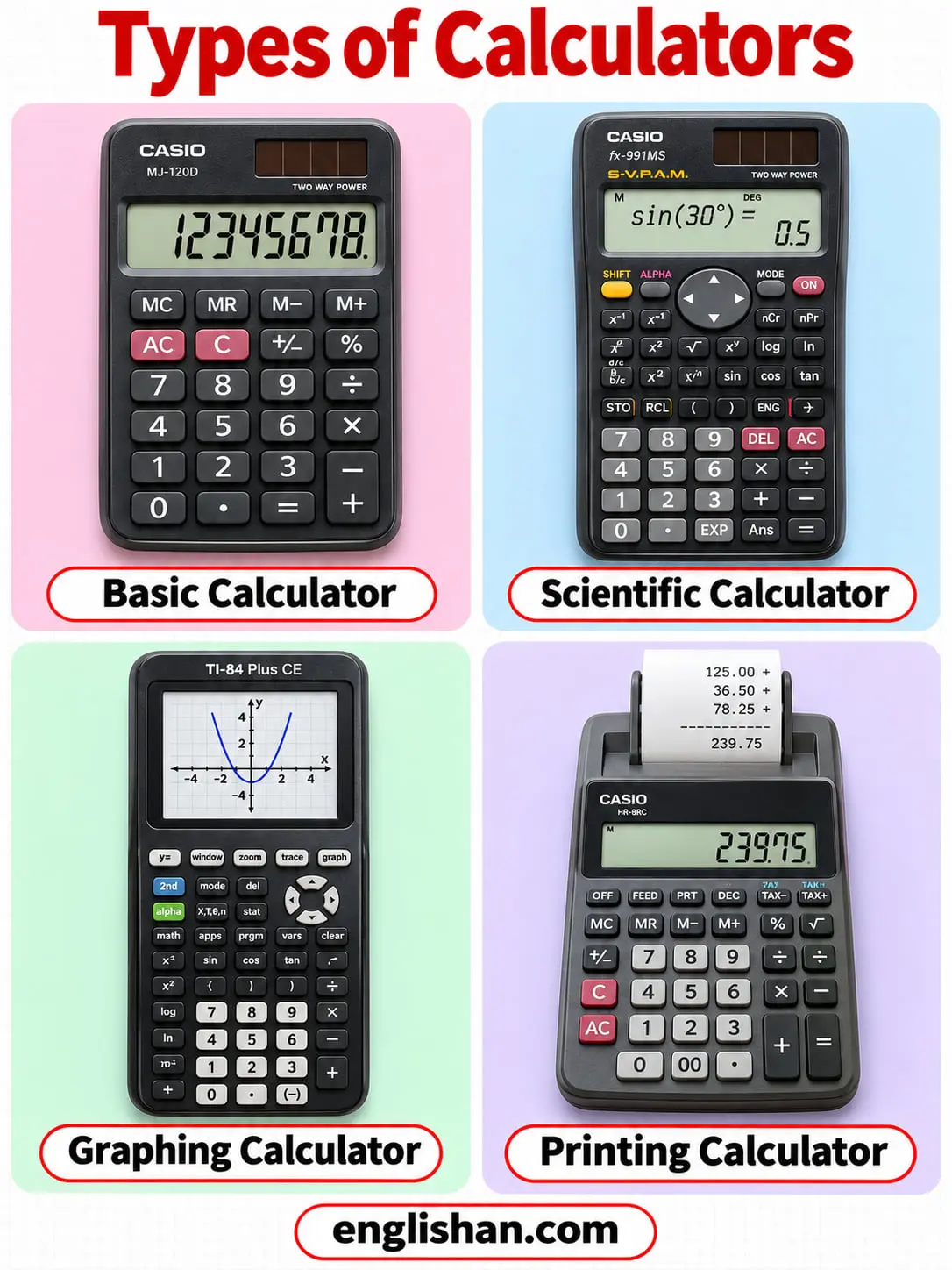
A graphing calculator adds a large screen that shows several lines of text and the graph of a function. Some models have a QWERTY keyboard, and others connect to an external keyboard. Programs and data are stored in internal memory.
A printing calculator adds a printing unit. It prints each result on a paper roll, in ink or by heat.
FAQs
FAQs
The parts of a calculator are the display, the keypad, the power source, the circuit board, and the chip. The keypad contains the digit, operation, equals, clear, memory, and function keys.
The chip performs the calculation. Its arithmetic logic unit executes the operation, and its registers store the numbers while the work is in progress.
Inside a calculator are a circuit board and a chip, with a battery in many models. The chip contains the registers, the memory, and the arithmetic logic unit.
C means clear. The C key, also marked AC for all clear, erases everything, and the CE key erases the last entry.
The 2nd function is the secondary function printed over a key. Pressing the 2nd key switches the next key from its main function to the printed one.
Related: